TL;DR
We built SeedSky-PACE (Physical Agent Coordination & Execution), a distributed embodied harness for native coding agents. Perception, execution and capability modules run as three external systems and give sessions complete, accurate, traceable interfaces. The harness itself only orchestrates: sessions are dispatched and collaborate by role, MCP draws the boundary with the outside world, and Skills and exploration distill reusable experience.
The system completes tasks such as multi-stage pick-and-place and cloth folding on a real 7-DoF arm. Every run records its reasoning, calls and observations in full, and the record can be replayed in lockstep with the video (Section 5).
Figure 1 gives an overview.
1. Introduction
One mainstream route to embodied intelligence is the vision–language–action model (VLA): train a model on robot manipulation data that outputs actions directly. It has advanced considerably on grasping and carrying, but objects, contact conditions and task combinations in the real world are so varied that limited demonstration data struggles to cover them.
The other route uses general-purpose models that already have world knowledge, visual understanding and long-horizon reasoning. Coding agents suit it especially well: they use tools, write and run programs, inspect results and revise their approach from feedback, while the 3D reconstruction, kinematics, trajectory planning, visual servoing and force control that robotics has accumulated are simply software they can call. Recent work has shown strong task-level capability of this paradigm on real robots12 and studied the effect of interface abstraction and programmatic execution34.
Embodied manipulation can thus move from policy learning that depends on task-specific data to autonomous problem solving built on general intelligence, existing tools and physical feedback. A set of systems questions follows: where perception comes from, how actions run continuously, how reasoning time is scheduled, how several sessions collaborate, and how experience accumulates. The rest of the article covers layering by timescale (Section 2), the three external systems (Section 3), the harness that orchestrates sessions (Section 4), and the execution trace of a complete run (Section 5).
1.2 Relation to existing approaches
Our work builds on several recent lines of methods and differs in how they are organized into a continuously running system (Table 1).
Table 1Comparison with existing approaches
| End-to-end action models | Coding agent + basic interface | This system | |
|---|---|---|---|
| Who decides | A trained policy | A general model, through code and tools | Several sessions with distinct roles, each keeping its native abilities |
| Perception and execution | Implicit in the policy | Camera observations, geometric computation and an end-effector interface1 | Observations with provenance, a continuously updated scene; pre-execution validation and an exclusive execution system |
| Continuous control | The policy emits actions step by step | Relies on the session calling step by step | Modules and local loops outside sessions, queryable and interruptible |
| Collaboration and experience | — | Single session; experience distilled externally10 | Dispatch by role and messaging; two accumulation paths, Skills and interface iteration |
2. Layering by Timescale
2.1 Timescales
A task may last minutes or hours, one grasp lasts tens of seconds, and target tracking, visual correction and contact judgement need tens to hundreds of updates per second. At the same time the system must keep receiving user instructions and watching the environment. If all of this is squeezed into one session’s reasoning loop, nobody watches the scene while the model reasons, and actions wait for reasoning to finish. Figure 2 lists the timescales that actually occur in our system, and Figure 3 shows how reasoning and action alternate in one run.
Data table
2.2 Three loops: goals flow down, events flow up
We therefore split the system into three nested loops by rhythm (Figure 4). Each loop runs at its own pace and exchanges only two things across the boundary: goals go down, events are reported up. The three loops read and write the same shared state and do not share context.
As a result, sessions need not monitor the scene frame by frame, modules need not wait for reasoning, and the execution loop enforces its safety constraints at every moment. The three loops are a way of organizing, not a restriction: a session may still bypass modules and issue actions directly, or write a control program on the spot for a task.
2.3 Three design trade-offs
How much to encapsulate. Hand-designed high-level primitives clearly improve model performance, but when a primitive hides the failure process, strong models lose the chance to correct it in time13. We therefore keep the low level to basic actions that return faithful receipts and rejection reasons; whether to wrap them into higher-level operations is left to sessions and capability modules.
Who decides. Routine deviations and failures are handled by the local loop or the task session and are not escalated step by step; only lost targets, repeated failures or resource conflicts are raised to a higher level. This reduces unnecessary reasoning and avoids missing changes that need a timely response.
How much freedom. The boundary carries only contracts; inside it a session may freely use terminals, files and code, including writing new control programs on the spot. Safety checks and control arbitration stay with the lowest layer and are independent of sessions.
2.4 Key mechanisms
These trade-offs are realized as six mechanisms, each aimed at a specific kind of failure (Table 2).
Table 2Key mechanisms
| Mechanism | Problem addressed | Implementation |
|---|---|---|
| Observations with provenance | Mismatched time, frame or calibration leading to wrong actions | Each observation carries capture time, frame and calibration version; acquisition, control and recording share one clock |
| Pre-execution validation | Dangerous actions discovered only at execution time | The whole path is checked before an action is accepted; a rejection states the violated constraint and margin |
| Control arbitration | Several sessions driving one device | One controller at a time; any connection may issue a stop |
| Uniform process interface | Continuous physical behavior is hard for sessions to supervise | Start, query, update goal, pause, resume and stop |
| Asking for help | A local loop meets a situation it cannot judge | The arm holds still and an image and summary are sent for a session to decide |
| Leases and interruption | Actions repeated after a session or machine drops out | An expired lease marks the job interrupted; actions already begun are never replayed automatically |
3. External Systems: Complete, Accurate, Traceable Interfaces
The three external systems (lower half of Figure 1) run independently of any session; sessions use them through MCP and never hold devices directly.
3.1 Perception: traceable observations
Perception hands a session more than numbers: it also hands over where the numbers come from, namely capture time, coordinate frame and calibration version. Acquisition, control and recording share one monotonic clock, so observations and robot state align directly. A coordinate that looks precise still leads to a wrong action if the timing does not match, the camera was bumped or the calibration changed. Perception is not a one-off snapshot but runs throughout execution: deforming objects or a person entering the workspace are reflected in the shared state immediately.
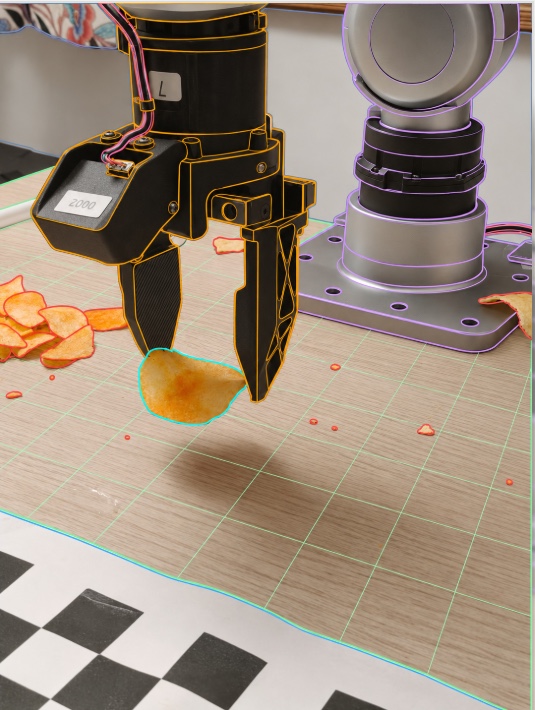
Shared perception service. Segmentation, fast tracking, object depth, hand detection and pan-tilt state run as a resident service and can capture RGB-D on demand; sessions, front ends and capability modules read the same data. Slow segmentation and fast tracking run in a relay, producing about 60 target-state updates per second for two targets with about 48 ms from exposure to output.
Hand detection. It runs frame by frame in parallel with segmentation. When a hand enters the workspace execution holds still and resumes only after the hand has been gone for one second; execution also stops if the image stream is interrupted for more than a second.
Continuously updated 3D scene. Multi-view RGB-D is fused under known camera poses5; background geometry and movable objects are maintained separately, so that when an object moves its pose and local shape are updated without ghosting, and the system records which regions have been observed, when, and which remain unknown.
Active observation. The pan-tilt unit turns toward the target and the wrist camera approaches the object to obtain a better viewpoint and close-range geometry on demand.
Extrinsic self-check. The head-camera image is compared pixel by pixel with the image from calibration, using the bolted base plate and the checkerboard as references, which distinguishes a bumped camera from a moved calibration board.
3.2 Execution: validate first, then execute
The arm, gripper and pan-tilt unit can only be reached through the execution system: it owns the devices, arbitrates control and enforces safety checks that sessions cannot bypass.
One bus service, one controller. The bus service owns the serial port and runs the control loop at 200 Hz; other programs, including sessions, can only reach it through a client. Only one connection may drive the devices at a time, while a stop command can be issued by any connection.
Calibration and dynamics model. Joint zeros are calibrated (to within about 1°), and the mass and centre of mass of every link, including the gripper and camera, feed gravity compensation; at power-up the motor turn count is recovered from the calibrated limits, and a joint whose turn count cannot be determined is refused position control. The wrist camera’s intrinsics and hand–eye relation and the depth camera’s extrinsics are calibrated as well and recorded with every observation.
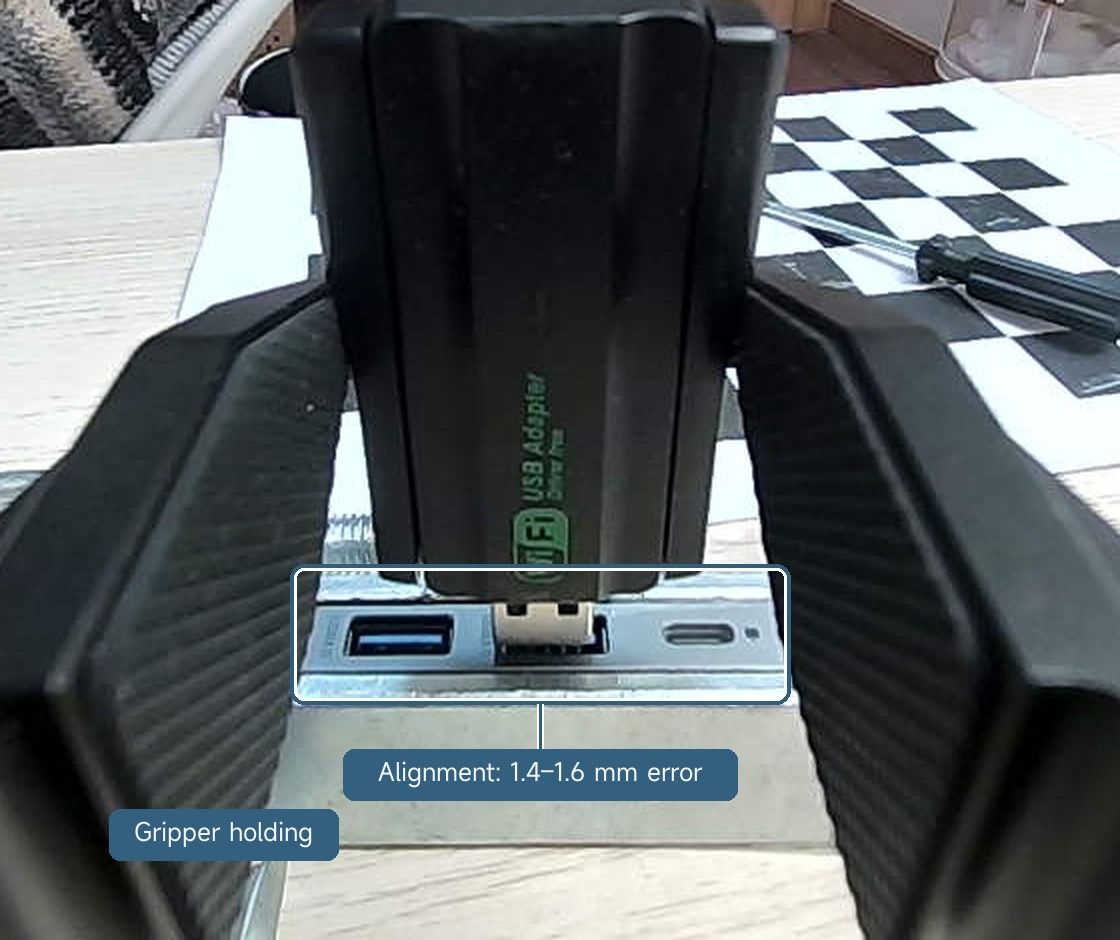
Precise alignment. Joint static friction and gravity-model residuals leave an open-loop error of about 1°, and with the arm extended the fingertip can be off by about 1.5 cm. The execution system therefore offers an exact-arrival option and, near the target, works with the wrist camera to check and correct: in the replayed insertion task the position error before alignment was 1.4–1.6 mm, the gripper stopped before reaching the target opening, and both are recorded in the receipt.
Path check before execution. Before an action is accepted, joint limits, table collision and wrist self-collision are checked along the whole path; execution stops if the tracking error exceeds a threshold, and gripper torque is limited. A rejected action returns the violated constraint and its margin, and when planning has no solution it returns the nearest reachable pose.
Measured receipts. Every action returns the measured position, error and gripper state instead of “command sent”.
Contact and force. Contact and grasp state are inferred from motor torque, tracking error and gripper opening, and wrist force sensing and fingertip tactile sensing are integrated; contact is a continuous constraint during execution, not just an after-the-fact judgement6.
Extensible embodiment. The arm, gripper and pan-tilt unit share one interface and one control arbitration; the interface stays the same as the body grows to more joints and eventually whole-body control.
3.3 Capability modules: closed loops outside sessions
An ordinary end-effector move is itself a continuing process; the only difference is whether the goal is updated from new observations while it runs. We therefore unify all continuing physical behavior behind one process interface: start, query, update goal, pause, resume and stop (Figure 7).
Whether a process uses trajectory planning, visual servoing, predictive control or a VLA7 is up to the module; a session need not know the controller’s internals but can always query progress, change the goal or take over. If a high-level routine hides the failure process, the session cannot see what went wrong and cannot correct it in time1.
Each of the four modes has corresponding modules. Visual servoing and dynamic grasping keep tracking the target’s pose and velocity and update the local trajectory89: the approach phase uses 3D pose control, fine alignment fuses position-based and image-based visual servoing, and model-predictive control handles motion prediction and constraints together; VLAs and small visual control models generate local actions continuously from observations. Video models and speech provide input to the observer and voice sessions (Table 3). Figure 8 shows one run of visual servoing in cloth folding.
These modules can be used alone or combined by task phase. A prototype of the local-loop controller runs on the host computer and drives the 200 Hz bus at 20 Hz: it converts targets from the perception front end into the arm frame, follows the object, detects contact and grasp, retries once on failure, checks the result with images, and relocalizes after the front end has been moved. In situations it cannot judge itself—a lost target, two failed grasps in a row, unexpected contact or an unconfirmable result—it holds the arm still and sends an image and a one-line summary so that a session can decide whether to continue, retry, fine-tune or abort.
All modules attach through one contract: a session starts a module through MCP; the module reads the shared observations, controls through the execution interface step by step, and writes every frame’s control receipt as well as pause, resume and stop into the event stream. Modules may be deployed on other machines, but any physical action still has to pass the execution system’s control check.
4. Harness: Session Orchestration and Collaboration
4.1 Session dispatch
In the harness there is no fixed chain of command among sessions. A coordinator keeps the work queue; workers on this or other machines claim work by role and hold it with leases. Once a lease is lost the job is marked interrupted, and physical actions already begun are never replayed automatically (Figure 9). Sessions exchange messages through inboxes and the receiver reads them at a suitable moment.
Table 3Session roles
| Role | Responsibility |
|---|---|
| Task session | Takes a goal; observes, programs, calls capabilities, handles failures and confirms the result; retries routine failures on its own. |
| Observer session | Watches the scene continuously with a faster video model and alerts the task session when an object slips, tips over or progress goes wrong. |
| Voice session | Listens to the user continuously and routes new requests (such as “use the other cup”) to the responsible session. |
| Long-running session | Keeps long-lived context, explores, researches or maintains a capability, and hands verified results to other sessions. |
| Interface-maintenance session | Improves the MCP interface according to capability gaps exposed by tasks; needs no robot connection. |
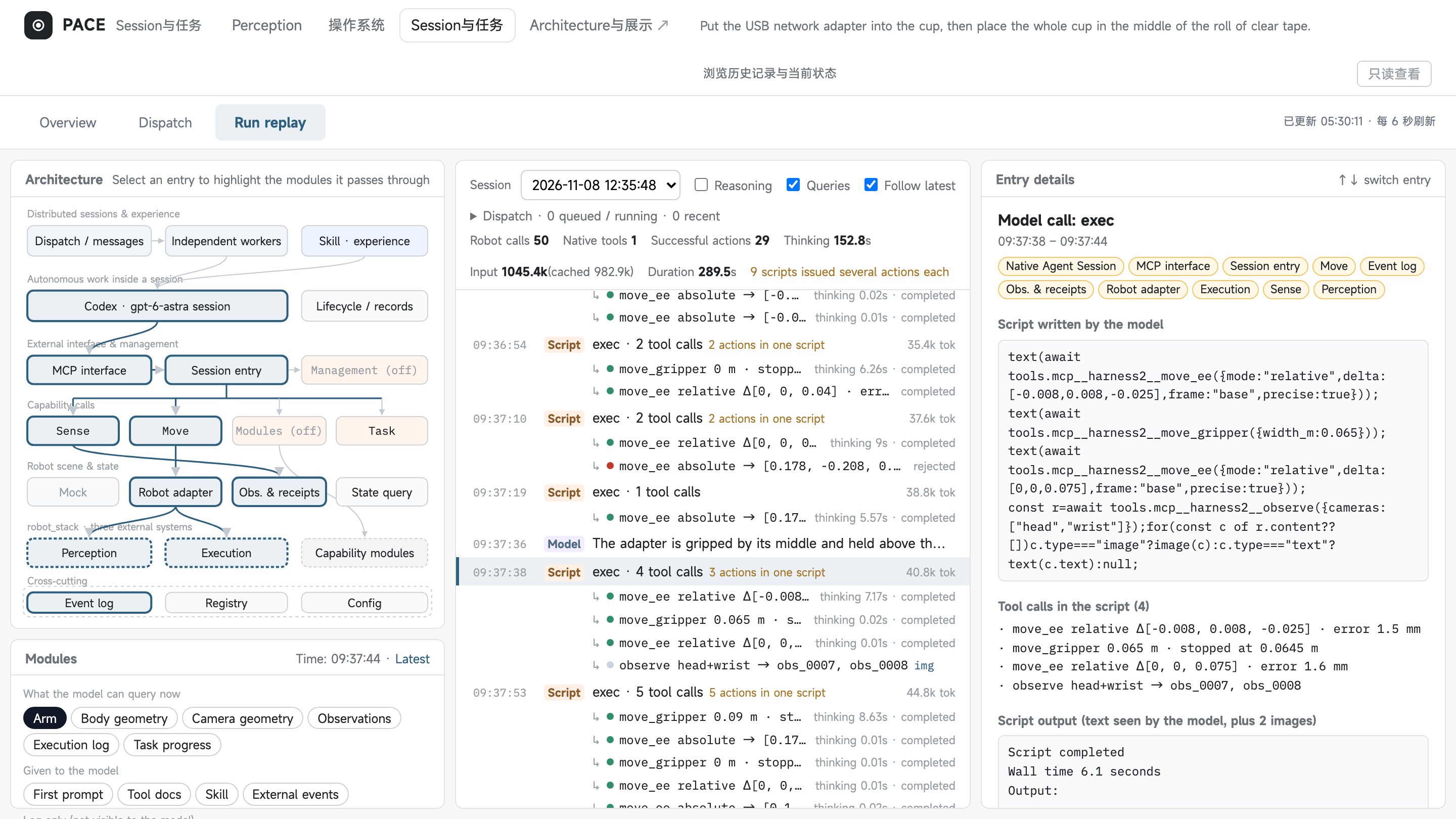
Different roles may use models of different sizes and modalities: a strong model for hard task solving, a light video model for continuous supervision, and high-frequency local feedback left to modules. Sessions share task goals, physical state, execution events and permissions, not their whole context. Several sessions may observe, reason and prepare at the same time, but only one physical job is released at a time, and the control arbitration of the execution system has the final say. Every session’s reasoning, calls, observations and actions are recorded in full and can be replayed entry by entry in the monitor (Figure 10).
4.2 MCP: interface contract and session autonomy
MCP is the only boundary between a session and the outside world: dispatching work, messaging, and calling perception, execution and capability modules all go through MCP. Not every step inside a session has to be wrapped as a tool—a session can read images, compute geometry and write a program that chains several actions into one script, just as it would work in any code repository.
MCP, Skills and the execution services have different jobs: MCP defines what can be done, Skills record how to do it better, and modules and the execution system do the actual work. Take grasping a moving object: a Skill tells the session how to set the goal and when to switch to visual servoing; MCP submits and manages the execution; target tracking and trajectory updates are carried out continuously by the local loop.
4.3 Accumulating experience and self-exploration
The inputs of both paths come from real work products (Figure 12): at the start of a task the session reads the relevant Skill; after the task it writes a note in the same session, whose interface-facing suggestions are exactly the input of the maintenance session.
skills/grasp-and-place/SKILL.mdRead at the start of the task · excerptNOTE_1.mdWritten by the session after the task · excerptSelf-exploration is done by long-running sessions: they try repeatedly in real or simulated environments and distill what works together with its conditions of applicability, validate it in new scenes and explore again when it stops working1011. Observer sessions and complete logs provide independent failure diagnosis and help find program defects and unstable conditions. The local loop has the same mechanism: when a session answers a request for help it can adjust one rule parameter of the local loop; the new value is saved and the next run starts from it.
5. Replayable Execution Traces
Every run leaves a complete record: what the model said, which code it wrote, which tools it called, what the robot returned and which image it saw. The record is aligned with the video by timestamp and can be replayed as below: click any entry and the video jumps to that moment; the ticks on the timeline mark key moments. The model’s own messages were written in Chinese and are translated here.
6. System Organization and Directory Layout
We organize and maintain the harness as a long-running software system. The directory layout mirrors the architecture (Table 4).
Table 4Directories and the architecture
| Directory | Maps to | Contents |
|---|---|---|
robot_stack/perception/ | Perception | Camera services, shared perception service, geometry, visual calibration |
robot_stack/execution/ | Execution | Drivers and bus service, kinematics, control arbitration and safety checks |
robot_stack/components/ | Capability modules | Module catalog and process contract, visual following, recording |
harness2/runtime/ | Session dispatch | Work queue, workers, session lifecycle, management interface |
harness2/mcp/ | MCP boundary | Tool and resource registry, management interface, adapters to external systems |
harness2/learning/ | Skills | Experience index and reading |
harness2/reporting/ | Shared state | Timelines, records and recordings |
visualization/ | Front end | Robot console, perception page, session monitor and replay, presentation material |
A coding agent reads the notes, coordinate definitions, calibration records and Skills in these directories directly, so how the documentation is organized is itself an interface.
7. Evaluation: Four Task Classes
We use four classes of tasks as a common axis of evaluation (Table 5). The same set of tasks serves to test perception and execution and to compare different session organizations and combinations of capabilities.
Table 5Evaluation tasks
| Class | Typical tasks | Metrics |
|---|---|---|
| Static high precision | USB alignment, small-object grasping, precise placement, insertion | Target error, success rate, number of retries |
| Dynamic closed loop | Tracking and grasping moving objects, target disturbance, dynamic obstacle avoidance | Tracking error, response latency, supported speed |
| Contact and force interaction | Insertion, opening drawers, wiping, fragile objects | Contact detection, force control, slip |
| Long-horizon and parallel | Multi-stage assembly, tidying a table, multi-task scheduling | Completion rate, time, resource conflicts, experience reuse |
8. Conclusion
Our aim is for a general-purpose coding agent to keep its full capacity for autonomous reasoning and exploration, while existing robotics technology becomes physical capability it can keep using, composing, supervising and improving.
Citation
@misc{seedsky_pace2026,
  title  = {SeedSky-PACE: A Distributed Embodied Harness That Turns the Physical World into a Workspace for Coding Agents},
  author = {{SeedSky Team}},
  year   = {2026},
  url    = {https://seedsky.ai/papers/pace/}
}
References
- On Agentic Manipulation Policies. Apple, 2026.
- Agent as Policy for Robotic Manipulation. 2026.
- CaP-X: A Framework for Benchmarking and Improving Coding Agents for Robot Manipulation. ICML 2026.
- PyRUA-Lean. 2026.
- NVIDIA Isaac ROS nvblox.
- FORCA: A Force-Aware Coding Agent for Contact-Rich Robot Manipulation. 2026.
- Towards Long-horizon Embodied Agents with Tool-Aligned Vision-Language-Action Models. 2026.
- ReKep: Spatio-Temporal Reasoning of Relational Keypoint Constraints for Robotic Manipulation. CoRL 2024.
- Language-driven Closed-loop Grasping with Model-predictive Trajectory Optimization. 2025.
- EmbodiedEvo: Self-Evolving Coding Agent for Physical Intelligence. 2026.
- Zetta: An Efficient Closed-Loop Embodied Harness for Self-Evolving Physical Intelligence. 2026.